

Essential Features Every Small Business Website Needs
Having a website is essential for every business. If you don’t have a website, it’s a bit like having a shop and painting all the windows black. Your website is your storefront. It allows your potential customers to peek into your shop window before making that commitment to open the door and enter the shop, or in the case of a website deciding to email you or give you a call. There isn’t a single business out there that wouldn’t benefit from a website.
But the key is that it needs to be a well designed website. Returning to the shop window analogy, you wouldn’t want to go into a shop that has an absolute mess in the window. Creating window displays is a well paid professional because businesses know that a great window display will get people into the shop, spending money. Think of the window displays in London at Christmas. Your website is the same. If it’s not well designed, people won’t pick up the phone and call you or buy your products.
So let’s look at what every well designed website needs.
Mobile responsiveness
We all spend more time on our phone and it’s absolutely essential that your website is mobile responsive. Depending on the niche your business is in, 100% of your customers might view your website on mobile. If you are business to business this will be lower as most b2b searches are carried out on a desktop or laptop, but your site still needs to look great on mobile.
Clear Calls to Action (CTA’s)
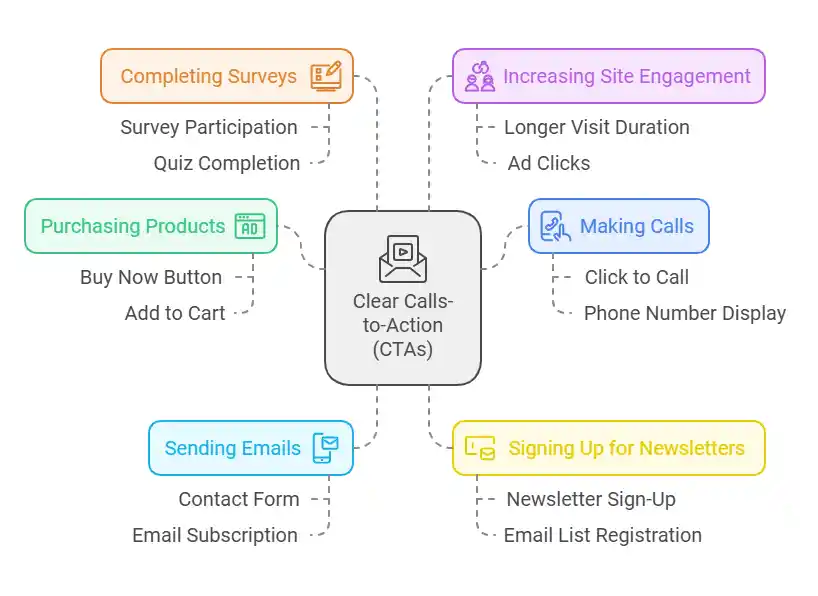
No matter what industry you are in, your website needs to have an end goal. Examples of these include:
- Customers buying your products
- Potential customers calling you
- Potential customers emailing you/completing a contact form
- Signing up to your email list
- Filling in a survey or quiz
- Staying on your site for longer so that there is more chance that they click on ads
A Call to Action is a way to draw attention to what you want your site visitor to do. This is usually in the form of a strategically placed button or pop up.
fast Load Times
People’s attention spans are getting shorter and shorter (well done if you’ve read to this point!). If a site doesn’t load quickly, then they will just simply click away. I’m sure we’ve all been there when browsing!
Easy Navigation
This is one of the most important aspects of a website. If people can’t find what they’re looking for then they’ll click away. A website should make it really easy for visitors to navigate by ensuring that there are links not only in the site header (the part at the very top) but also in relevant places throughout each page of the website.
Contact details and forms
Have you ever tried to get in touch with a company and struggled to find their contact info (hello Amazon and PayPal). It is so frustrating. Make sure that your contact details are really easy to find. You could lose customers otherwise.
I also recommend having both a contact form and your email address on the website. Some people don’t like using contact forms because they worry that the message won’t get sent and because they don’t have a record of what they wrote. So they prefer to email. Others much prefer a contact form because it’s easier. Have both and then you keep everyone happy!
You might also want to offer a chatbot on your website. These are very common now and are great for customers who want a quick answer but don’t want to pick up the phone. Just be aware that it’s better to have a live person at the end of the chat. AI chatbots are becoming more and more common and I have yet to meet someone who doesn’t find them frustrating. “Just let me speak to a human” is commonly shouted at my own PC.
Search Engine Optimisation (SEO)
There is no point having a beautiful website if nobody can find it. SEO is the most important ongoing part of having a website. I could write forever about SEO and it’s importance but instead you can visit my own info on cheap SEO services.
SSL certificates for security
These were introduced years ago as standard after Google and Bing started showing a warning if a website didn’t have one. You’re probably not even aware that sites have them. A website with an SSL used to have a padlock in the top left of all browsers. This now varies by browser.
In Microsoft Edge and FireFox, if the site has an SSL it still shows as a padlock in the corner.


Chrome used to show it here but you now have to click on the symbol next to the url (hover over it and says “view site information”) and it then shows the site is secure.
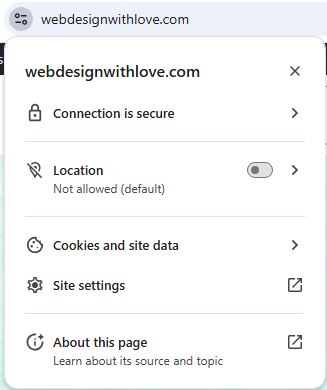
Most importantly if you site doesn’t have an SSL then a warning will show that the site is secure and the browser will recommend not continuing to the site. This is a disaster as nobody will ever see your site.
There is absolutely no excuse not to have an SSL. Google and other large corporations grouped together got together and offer Let’s Encrypt SSLs for free. If your hosting or wen design company are trying to charge you for an SSL, they are ripping you off (the exception being very sales ecommerce sites which may choose to have a higher lever of protection with a paid SSL).
Social media integration
While it’s important to include links to your social media on your website, these shouldn’t dominate. You should be aiming to drive visitors to your website from your social media, not sending people to your social media from your website.
This is because your website is designed to do the selling for you. Customers can find every bit of information they need on your website, providing it’s easy to navigate (see above point). Social media is just not set up to do this. Plus we all know that rabbit hole that social media can take you down! Imagine this. A customer is on your website. Let’s say that you sell cakes (because who doesn’t love a cake?!). Your social media icon is too prominent on your website and the visitor, who was thinking of ordering one of your cakes clicks your social media link. They see your lovely cakes on social media, but they also see all the other things that the social media algorithm knows they like. So before you know it, they are no longer looking at your cakes, but one of your competitors. You have now lost the sale. Instead, have a gallery of cakes on your website and there is no reason for them to click away. So yes, your social media links should be on your site, but not dominant.
Blog or resource section
A client of mine was telling her 20 something daughter about the blog on her website. Her daughter was astounded that blogs were still a thing. My client and I felt very old suddenly. Does that mean that you shouldn’t have a blog? Absolutely not. But depending on the age of your ideal client you might not call it a blog. It could be “latest news”, “case studies”, “projects” or whatever suits your business. But whatever you call it, I highly recommend having one. Not only is it one of the best things that you can do for SEO, but it also shows that your site is up to date if you post regularly.
Conclusion
There is so much more to planning a website than just throwing it together. You want to make sure that the website is well designed to ensure that is converts as well as it can.